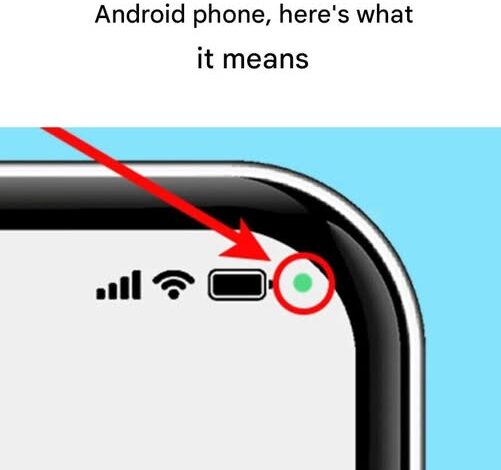
In the fast-moving digital world of 2026, smartphones are no longer just tools—they are deeply woven into our private lives. They store our conversations, track our movements, manage our finances, and often know more about us than we consciously realize. As connectivity increases, so does the need for personal control over how our data and devices behave. For users within the Samsung ecosystem running Android, one small visual cue has sparked growing attention: the subtle green dot that appears in the upper-right corner of the screen.
At first glance, it looks like a simple design element. In reality, it is one of the most important privacy safeguards built into modern mobile operating systems. That small green indicator acts as a live monitor for your phone’s most sensitive components, giving you immediate awareness of when your device is actively “seeing” or “hearing.”
Mobile platforms have moved decisively toward transparency. Similar to privacy indicators introduced on the iPhone, both Google and Samsung now prioritize real-time user awareness. The green dot functions as a constant status signal—your phone openly disclosing its own activity. Years ago, it was technically possible for poorly designed or malicious apps to activate the camera or microphone in the background without any visible warning. In 2026, that kind of silent access is no longer acceptable or invisible.
When the green dot appears, it means exactly one thing: an app is currently using your camera, your microphone, or both. On Android devices, this single icon represents all sensor access, simplifying what could otherwise be confusing alerts. Apple’s iOS separates these indicators—green for camera use, orange for microphone—but Android’s unified approach offers a clean, unmistakable prompt that encourages users to pause and assess whether the activity makes sense.
Most of the time, the green dot appears during normal, expected behavior. Video calls, voice recordings, photo sessions, and social media uploads all require sensor access. In those moments, the indicator is reassuring—it confirms that the hardware is active for a reason you understand. The real value emerges when the dot appears unexpectedly. If your phone is idle, or you’re browsing text-only content, and that green signal suddenly lights up, it’s a warning worth taking seriously. It suggests that something in the background is accessing your microphone or camera without your immediate awareness.
Samsung and Android go a step further by making this feature interactive. The dot isn’t just informational—it’s actionable. When it appears, it may briefly show a camera or microphone icon before shrinking into the dot. To find out which app is responsible, you simply swipe down to open the notification panel. Tapping the green indicator reveals a clear message identifying the app currently using the sensor.
This instant clarity gives control back to the user. If the app listed is one you’re actively using and trust, there’s nothing more to do. But if the notification points to an app that has no logical reason to access your microphone—like a calculator or a basic game—it’s an immediate signal that something isn’t right. That awareness is essential in a time when data collection and passive surveillance are ongoing concerns.
From there, Android’s permission system allows for precise action. You can limit access to “only while using the app,” require approval every time, or block access entirely. If an app consistently oversteps its role, removing its permissions—or uninstalling it altogether—is often the smartest move. Beyond improving privacy, trimming unnecessary apps can also lead to better battery life and smoother system performance.
The green dot reflects a larger shift in 2026 toward privacy-first design. Across industries—whether in debates about AI monitoring or scrutiny of digital behavior—the demand for transparency is louder than ever. People no longer accept technology that operates as a black box. We want visibility, accountability, and choice. This tiny indicator is a personal, everyday example of that philosophy in action.
It also influences developers. Knowing that users will instantly see when sensors are activated discourages unnecessary access and promotes ethical design. It reinforces the principle of “least privilege,” where apps request only the permissions they genuinely need. When misuse is immediately visible, respecting user boundaries becomes the smarter—and safer—option.
Ultimately, the green dot isn’t a threat; it’s an ally. It represents progress in the ongoing fight for digital rights. Instead of silently collecting data, your phone now communicates openly. Taking a few seconds to check that indicator is a small habit with meaningful impact—it’s how you stay informed, protected, and in control.
In a time when privacy is often described as obsolete, this feature proves otherwise. The Android green dot may be small, but it carries significant weight. It’s a reminder that even in a hyper-connected world, users still have the power to decide who gets access—and who doesn’t.